Chalk Art Brushes: A Comprehensive Guide to Digital Hand-Drawn Textures
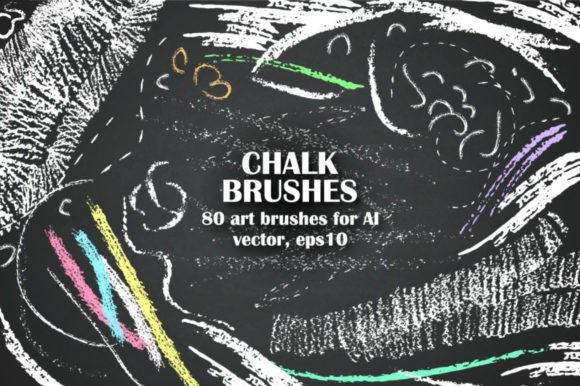
In the world of digital design, achieving an authentic hand-drawn aesthetic has historically been a labor-intensive process. Designers often find themselves spending hours sketching textures or searching for high-quality stock photos that rarely fit the specific context of a project. This is where Chalk Art Brushes transform the workflow. Specifically, the handy set of 80 chalk brushes vector assets offers a robust solution for creators who need to write, draw, decorate, and create messy, organic textures without leaving their digital workspace.
Whether you are a graphic designer crafting a brand identity, a marketer designing social media assets, or an educator preparing engaging classroom materials, these tools provide immediate access to realistic chalkboard aesthetics. The collection is designed to be easy to use, allowing users to apply effects to any path, adjust size and color dynamically, and switch between thin, fine lines and rough, textured strokes with minimal effort.
What Are Chalk Art Brushes?
Chalk Art Brushes are not merely simple line tools; they are complex vector brush sets engineered to mimic the physical properties of chalk on a slate surface. Unlike raster-based brushes that rely on pixel data, this set utilizes EPS10 and AI (Adobe Illustrator) formats. This distinction is crucial for professionals because it ensures scalability. You can resize your designs from a business card to a billboard without losing the integrity of the chalk texture.
The set includes 80 distinct vector brushes, providing a wide variety of stroke types. Some brushes are optimized for clean, legible typography, while others are designed to generate gritty, expressive backgrounds. By integrating these into Adobe Illustrator, designers gain a library of pre-made elements that save significant time compared to drawing each element from scratch.
Key Components of the Vector Set
Beyond the core brush set, this package is comprehensive, including premade design elements that leverage the same visual language. These additions expand the utility of the product beyond basic drawing:
- Chalk Arrow Set: Essential for infographics, presentations, and pointing out key features in layouts. These arrows maintain the hand-drawn feel while guiding the viewer’s eye effectively.
- Chalk Decorative Frame Set: Perfect for highlighting quotes, testimonials, or product features. Frames add structure to chaotic, artistic layouts.
- Chalk Wreaths: Ideal for seasonal marketing campaigns, holiday promotions, or adding a touch of elegance to event invitations.
- Chalkboards (Black and Green): Pre-made background elements that allow designers to instantly establish a classroom, café, or vintage aesthetic without needing to construct the base layer manually.
All components come with JPG previews for quick reference, ensuring you know exactly what each asset looks like before implementation.
Practical Applications Across Industries
The versatility of Chalk Art Brushes makes them applicable across a diverse range of professional and personal environments. Here is how different user groups can leverage these tools:
Marketing and Branding
For entrepreneurs and marketers, authenticity is a powerful tool. In an era of polished, sterile digital content, a chalk-style aesthetic signals approachability, creativity, and craftsmanship. Small businesses, particularly in the food and beverage industry (like bakeries, coffee shops, and breweries), frequently use chalkboard menus and signage. Digital equivalents created with these brushes allow for rapid prototyping and consistent branding across digital platforms.
Furthermore, "messy" textures break up monotony. When used as subtle overlays on websites or in email newsletters, chalk textures can add depth and tactile quality to flat designs, increasing engagement by making the content feel more human.
Education and Presentation
Educators and trainers often struggle to make digital slides feel interactive. Using Chalk Art Brushes to create slide titles, diagrams, or annotation highlights can mimic the familiar experience of a whiteboard or blackboard lesson. This familiarity can reduce cognitive load for students, making complex information easier to digest. The ability to quickly draw arrows and circles around key points during live presentations or in recorded tutorials adds a dynamic, instructional layer to static content.
Social Media and Content Creation
Blogger and publisher audiences expect visual variety. Instagram stories, Pinterest pins, and YouTube thumbnails benefit greatly from the contrast provided by chalk textures against solid backgrounds. The rough textures of the brushes can be used to create borders or highlight text, ensuring that important messages stand out in a crowded feed. Because the brushes are vectors, they remain crisp even when scaled up for large-format prints or banners.
Technical Specifications and Compatibility
It is important to note that this product requires Adobe Illustrator to function. It is not compatible with other design software like Photoshop or Canva directly, as it relies on Illustrator’s brush engine. However, once applied, the results can be exported to various formats suitable for web, print, or video production.
The file formats included are EPS10 and AI. EPS10 is particularly valuable for compatibility with older systems or for integration into workflows that require editable vector paths. The inclusion of JPG previews aids in organization, allowing designers to browse the 80 brushes visually without opening every single file.
Usability and Efficiency
The primary strength of this set lies in its ease of use. Traditional chalk art requires precision and patience; if you make a mistake, you have to erase the entire board. With Chalk Art Brushes, mistakes are easily corrected. You can adjust the size, color, and opacity of any stroke after it has been drawn. This non-destructive editing capability significantly boosts productivity, allowing designers to experiment freely.
Additionally, the option to save the brushes into the Adobe Brush Library means that once installed, they are available in any Illustrator document. This eliminates the need to open separate files for every new project, streamlining the creative process for long-term users.
How to Use the Brushes Effectively
Getting started with Chalk Art Brushes is straightforward, but following best practices will yield the best results. Here is a practical guide to implementing these tools:
- Open the Source Files: Launch Adobe Illustrator and open one of the provided .AI or .EPS files. These files serve as both the source of the brushes and a preview gallery.
- Access the Brush Panel: Navigate to Window > Brushes. You will see the full library of 80 chalk brushes listed here.
- Create a Path: Use any drawing tool (Pen, Pencil, or Brush Tool) to create a shape or line on your art board. Ensure the path is selected.
- Apply the Brush: Click on a brush from the panel. The path will instantly adopt the chalk texture. Experiment with different brushes to find the right level of roughness or fineness for your needs.
- Adjust Properties: Use the Stroke panel to modify the weight of the brush. Since these are vector brushes, you can scale them infinitely without pixelation. Change the color to match your brand palette or simulate different colored chalks.
- Save to Library: For permanent access, drag the brushes from the Brushes panel into the Libraries panel. This allows you to reuse them across all future projects without re-importing the files.
Considerations for Implementation
While Chalk Art Brushes offer immense value, there are practical considerations to keep in mind. First, always work with vector layers until the final export stage. This preserves the editability of the chalk effects. Second, be mindful of contrast. Chalk textures can become muddy if placed on busy backgrounds. Use the included chalkboard templates or solid color backgrounds to ensure readability.
Finally, consider the context of your audience. While chalk aesthetics evoke nostalgia and warmth, they may not align with highly corporate, minimalist, or tech-focused brands that prioritize sleek, geometric precision. Use these brushes strategically to add character rather than as a default style for all projects.
In summary, the Chalk Art Brushes vector set is a powerful resource for anyone looking to inject organic, hand-crafted charm into their digital designs. By combining 80 versatile brushes with ready-made decorative elements, it offers a complete toolkit for creating memorable, textured visuals efficiently. Whether you are decorating a digital invitation, designing a menu, or enhancing a blog post, these brushes provide the professional finish and creative flexibility needed to stand out.